Simulator uses port 80 for the web server. This is mandatory for proper communication. Before starting Simulator, please close any application, such as VOIP, Skype, or IIS, that may use port 80. If another service is using port 80, you will receive a prompt to close the application and retry Simulator.
If you are experiencing trouble determining what software is using port 80:
netstat -o from a command prompt. This will output a list of ports and the process ID using the port. In this example, process 4000 is using port 80.C:\Users\Admin>netstat -o
Active Connections
Proto Local Address Foreign Address State PID
TCP xxx.xxx.xxx.xxx:2492 blugro5relay:2492 ESTABLISHED 5232
TCP xxx.xxx.xxx.xxx:80 173:http ESTABLISHED 4000
TCP xxx.xxx.xxx.xxx:80 173:http ESTABLISHED 4000
TCP xxx.xxx.xxx.xxx:53405 cs115p1:5050 ESTABLISHED 1688
TCP xxx.xxx.xxx.xxx:53416 bos-m001c-rdr2:https ESTABLISHED 1688
TCP xxx.xxx.xxx.xxx:53418 chat-d03b-rdr2:https ESTABLISHED 1688
TCP xxx.xxx.xxx.xxx:53428 mtnradsvk1200:52230 ESTABLISHED 2076
TCP xxx.xxx.xxx.xxx:53442 pb-in-f125:5222 ESTABLISHED 4868
C:\Users\Admin>
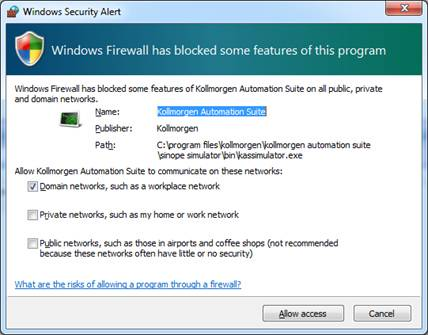
The first time Simulator is run it will attempt to open some TCP/IP ports to allow communication. Your system's firewall will detect this and prompt for an action. Allow the Simulator to open the ports by selecting Unblock (Windows XP) or Allow Access (Windows 7).
Figure 6-1: Firewall alert dialog.
After the project is debugged using KAS Simulator, it can be downloaded to the real controller in production. This operation can be done simply by modifying the IP address of the device and then Download the Application.
|
Stay Connected with Kollmorgen       
|
Copyright © 2015 Kollmorgen™ |

|